
10-Finger Typing: Complete Guide to Touch Typing (2026)
Learn 10-finger typing the right way. Free step-by-step guide, finger placement chart, drills, and a built-in speed test to track your progress.
Key Takeaways
- 10 finger typing (also called ten finger typing or touch typing) is the skill of using all ten fingers to type without looking at the keyboard.
- Most professionals who learn proper 10 finger typing reach 60–80 WPM, while hunt-and-peck typists rarely break 30 WPM.
- This guide covers correct hand position, daily drills, the most common mistakes, and a free 10 finger typing test so you can track real progress.
Typing is the keyboard skill almost every modern job depends on — yet most people never actually learn it the right way. They peck at the keys with two or four fingers, eyes glued to the keyboard, and plateau at 30–40 words per minute for life.
The good news? 10 finger typing is a learnable skill. With the right finger placement and 15 minutes of daily practice, most beginners double their typing speed within a month. This guide walks you through everything: what 10 finger typing is, how to learn it from scratch, the drills that actually work, and how to test your progress for free.
What Is 10-Finger Typing?
10 finger typing is the technique of typing with all ten fingers — each finger assigned to a specific group of keys — without looking at the keyboard. It is often called touch typing, ten finger typing, or blind typing, and all of these names refer to the same skill.
The idea is simple but powerful: instead of searching for each letter visually, your fingers learn the position of every key through muscle memory. Your eyes stay on the screen. Your brain focuses on what you want to write, not on where the keys are.
A few quick definitions to clear things up:
- Touch typing — the formal term used in textbooks and typing courses.
- 10-finger typing / 10finger typing / ten finger typing — popular casual terms for the same skill.
- 10 typing fingers — a phrasing you'll often see in search; same meaning.
- Finger 10 typing — sometimes used to describe drills that engage all ten fingers.
- Fingerprint typing — a common misspelling people search when they actually mean touch typing or 10 finger typing.
If you've ever wondered whether learning to use all 10 typing fingers is worth the effort, the answer is yes — and the rest of this guide will show you exactly how to get there.
Why 10-Finger Typing Matters in 2026
We type more than ever. Emails, Slack messages, code, essays, prompts, social posts — the keyboard is the single most-used tool in modern knowledge work. Even a small speed and accuracy improvement compounds into hours saved every week.
Here's what proper 10 finger typing unlocks:
- Speed. The average two-finger typist hits 25–35 WPM. The average trained 10-finger typist hits 60–80 WPM. Pros clear 100+ WPM.
- Accuracy. Because your fingers cover assigned zones, you make fewer mistakes — and you catch them faster because your eyes are already on the screen.
- Focus. When you don't have to think about where the keys are, you think more clearly about what you're writing.
- Less fatigue. Spreading work across 10 fingers reduces strain compared to overusing two index fingers.
- Better ergonomics. Proper hand position lowers the risk of repetitive strain injury, a real concern for anyone who types for hours each day. The OSHA computer workstation guidelines outline the posture basics worth following.
In short: 10 finger typing isn't just about speed. It's about doing one of your most-repeated daily tasks with less effort and fewer errors.
The 10-Finger Typing Hand Position
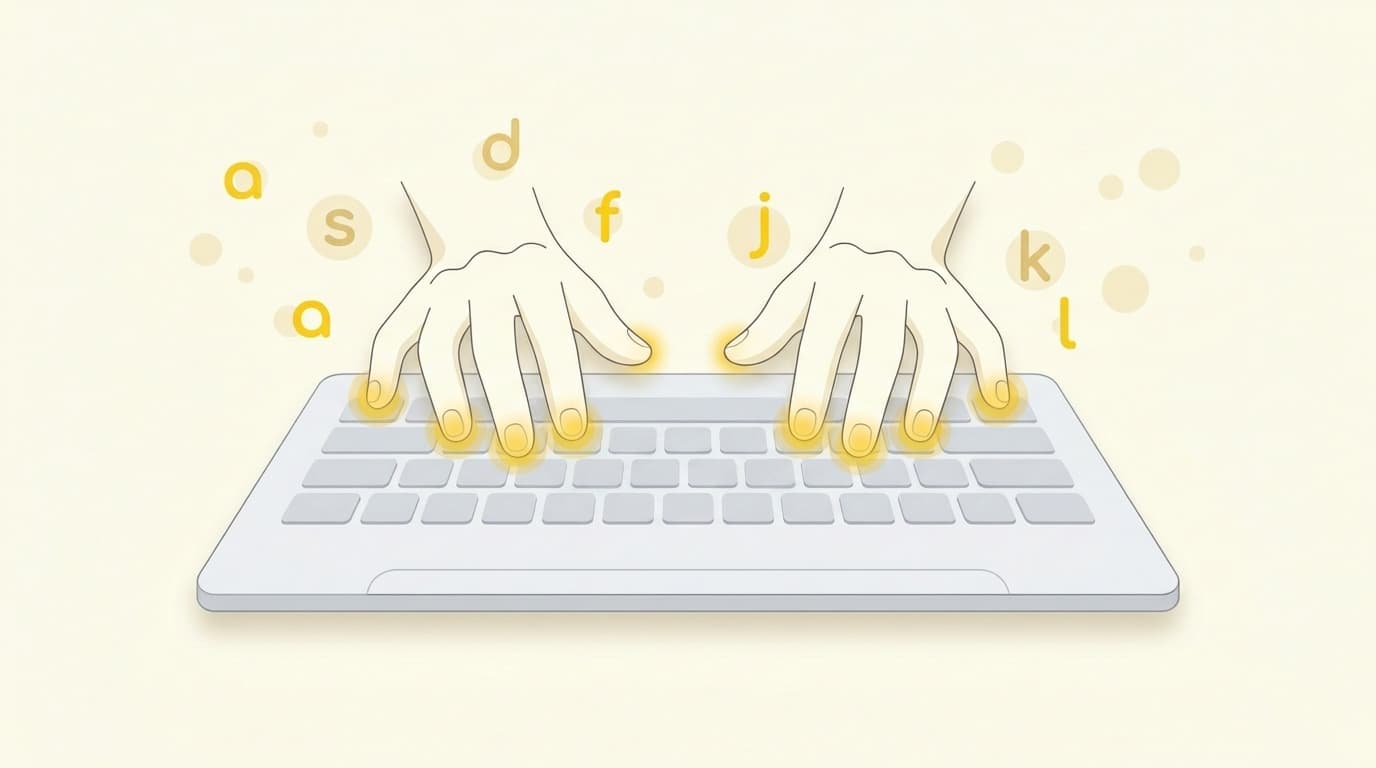
Everything in 10 finger typing starts from one place: the home row. This is the middle row of letter keys on a standard QWERTY keyboard. Your fingers rest here when they're not actively pressing other keys, and they always return here.
The home row keys are: A S D F (left hand) and J K L ; (right hand). Most keyboards have small bumps on the F and J keys so you can find the home row by feel alone — without looking down.
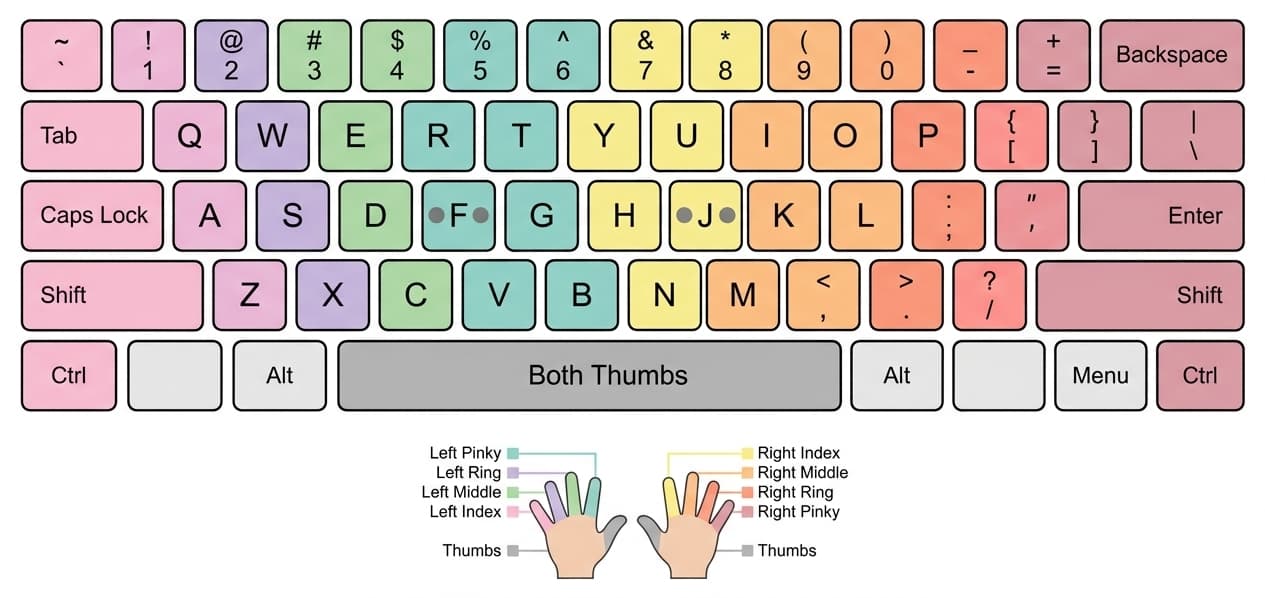
Left-hand fingers
- Pinky → A, Q, Z (and Shift, Tab, Caps Lock)
- Ring finger → S, W, X
- Middle finger → D, E, C
- Index finger → F, R, V, plus G, T, B (the index covers two columns)
- Thumb → Spacebar
Right-hand fingers
- Index finger → J, U, M, plus H, Y, N (mirrors the left index)
- Middle finger → K, I, ,
- Ring finger → L, O, .
- Pinky → ; , P, /, plus Enter, Shift, Backspace
- Thumb → Spacebar
Home row, top row, bottom row
Once your fingers are anchored on the home row, the top row (Q W E R T Y U I O P) is reached by stretching each finger up one key, and the bottom row (Z X C V B N M) is reached by curling each finger down one key. After every keystroke, your fingers float back to the home row. That return-to-home habit is the foundation of accurate 10 finger typing.
Step-by-Step: How to Learn 10-Finger Typing
You don't need expensive software or a fancy keyboard. You need a clear method and consistent practice. Here's the path that works for most beginners:
- Set up your posture. Sit upright. Feet flat. Wrists straight (not bent up or down). Screen at eye level. Elbows at roughly 90 degrees. Good posture isn't optional — bad posture is what causes wrist pain weeks later.
- Find the home row by feel. Place your left index on F and right index on J. Feel for the small bumps. Let the other fingers fall naturally onto A S D F and J K L ;. This is your starting and ending position for every keystroke.
- Cover the keyboard. Drape a cloth over your hands or use a blank keycap set. The point is to stop your eyes from cheating. Looking down breaks the muscle-memory loop you're trying to build.
- Drill the home row first. Type asdf jkl; over and over until each finger moves without thought. Then mix the letters into short words: as, ask, dad, sad, lad, fall, all, ask, lass.
- Add the top row. Once home row is automatic, layer in q w e r t and y u i o p. Practice common words that use these keys: the, were, you, your, type, water.
- Add the bottom row. Same drill with z x c v b n m. Then practice full pangrams like the quick brown fox jumps over the lazy dog — every letter, all ten fingers.
- Add capitals and punctuation. Use the opposite-hand pinky to hit Shift. If you're capitalizing T, your right index types T while your left pinky holds Shift.
- Drill numbers and symbols last. The number row is the slowest to learn because your fingers stretch the farthest. Practice these once your letter typing feels natural.
- Practice with real text, not just drills. After two weeks of drills, switch to typing real paragraphs from books, articles, or your own writing. This is where 10 finger typing practice translates into real-world speed.
- Test, don't just practice. A weekly 10 finger typing test keeps you honest about your progress and shows which letters or finger zones still slow you down.
Most people see meaningful improvement within 3–4 weeks of daily 15-minute sessions.
10-Finger Typing Drills and Practice Routines
Drills are how typing 10 fingers practice becomes typing 10 fingers reflex. Here are the four drills that punch above their weight:
- Home row repetition. Type
asdf jkl;for 60 seconds. Goal: zero errors. This builds the reset-to-home habit that makes everything else possible. - Trigram drills. Practice common three-letter combinations: the, ing, and, ent, ion, tio, for, ere. These appear in nearly every English sentence, so getting them automatic is huge.
- Pangram passes. Type pangrams (sentences using every letter) like Pack my box with five dozen liquor jugs on repeat. Forces all ten fingers to fire in real-world patterns.
- Weak-finger isolation. Most beginners have a slow ring finger or pinky. Pick the slowest finger and run targeted drills: was saw, lol pop, all opp, quill quiz. Five minutes a day fixes weeks of imbalance.
Build a 15-minute daily routine: 5 minutes of drills + 10 minutes of real-text typing. That mix beats an hour of unstructured practice any day of the week.
For something more game-like, try our Falling Words typing game — it builds reflexes under mild pressure, which is great for breaking through speed plateaus.
Common Mistakes to Avoid
Even motivated learners stall out because of a few avoidable habits. Watch out for these:
- Looking down at the keyboard. This is the single biggest blocker. If you peek, your brain never builds the muscle memory. Cover the keys.
- Using the wrong finger because it feels faster. Short-term it does. Long-term it caps your speed forever. Always use the assigned finger, even if it's slow at first.
- Skipping the home-row reset. Fingers should return to A S D F J K L ; after every keystroke. If they drift, accuracy collapses.
- Practicing too long without breaks. 15 focused minutes beats 60 distracted ones. Long unbroken sessions also raise injury risk.
- Chasing speed instead of accuracy. Speed comes from accuracy, not the other way around. Slow down until you're hitting 98%+ accuracy, then let speed grow on its own.
- Skipping the pinky. Many self-taught typists never use their pinkies properly. That single missing finger drags down both speed and ergonomics.
For a deeper breakdown, see our guide on the most common typing mistakes and how to fix them.
How to Test Your 10-Finger Typing Speed
You can't improve what you don't measure. A regular 10 finger typing test tells you three things: your WPM (words per minute), your accuracy percentage, and which keys are slowing you down.
A short test (60 seconds) is good for a quick check. A longer test (5 minutes) gives a much more honest picture, because it catches the fatigue and rhythm issues that short tests miss. Both have their place.
Try our free tools:
- Take a quick typing test on FastFingers.in — free, no signup, instant WPM and accuracy.
- Take the 5-minute typing test — the gold standard for measuring true sustained speed.
Test once a week. Log your WPM and accuracy. Watch the curve.
Average WPM by Skill Level
Here's a realistic benchmark for where 10 finger typing speeds land at each level:
| Skill Level | WPM | Accuracy | Description |
|---|---|---|---|
| Beginner | 20–35 | 90–94% | Just learning finger placement; still looking at the keyboard. |
| Intermediate | 40–55 | 95–97% | Comfortable with home row; eyes mostly on the screen. |
| Proficient | 60–80 | 97–99% | Smooth, rhythmic typing with minimal errors. The professional zone. |
| Pro / Pro+ | 90–120+ | 98–99%+ | Competitive typists; pure muscle memory; near-perfect accuracy. |
Hitting 60+ WPM with 97%+ accuracy is the realistic target for most people who commit to 10 finger typing practice for 4–6 weeks. That's the level where typing stops feeling like a task.
Tools and Games to Practice
Repetition is the price of fluency, but it doesn't have to be boring. The best practice mix combines structured drills, timed tests, and games that train your reflexes without feeling like work.
- Drills + real text for the foundation (covered above).
- 5-minute typing test weekly to measure progress.
- Falling Words game for reflex training and breaking through plateaus.
- More options in our roundup of 5 free typing games to make learning fun and easy.
If you're serious about hitting the top 10 fingers percentile of typists (90+ WPM), a mix of all four works better than grinding any one of them alone.
Final Thought
10 finger typing is one of the highest-ROI skills you can learn this year. A few weeks of focused practice gives you a faster, more accurate, and more comfortable way to do something you'll do millions of times in your life.
Start with the home row. Cover your hands. Take a free 10 finger typing test once a week and watch the curve climb.