
Average Typing Speed: What's a Good WPM in 2026? | FastFingers
The average typing speed is 40 WPM. See how you compare by age, job, and skill level — plus a free 1-minute typing test to measure your WPM instantly.
TL;DR The average typing speed is around 40 words per minute (WPM) with about 92% accuracy. Most everyday adult typists land between 38–45 WPM on a standard 1-minute test. Professional typists exceed 65–75 WPM, and top competitive typists reach 120+ WPM. Where you fall depends on age, practice, and technique.
Most people think they type faster than they actually do. Ask anyone and they'll guess 60 WPM — but the average typing speed across large public datasets sits closer to 40 WPM. The good news? With proper technique and 15 minutes of daily practice, most people can move from average to "good" (60+ WPM) in a couple of months.
This guide pulls together real, sourced numbers on average WPM by age, job, and skill level — plus how WPM is calculated, what counts as a good speed in 2026, and a realistic plan to improve it. When you're ready to test yourself, take our free typing speed test — no signup needed.
What Is the Average Typing Speed?
The average typing speed for adults is around 40 WPM, a figure that appears consistently across large-scale typing datasets. According to Wikipedia's words-per-minute reference, early research by Karat et al. (1999) found average computer users typing at roughly 32.5 WPM for transcription and 19 WPM for composition — but those numbers have crept upward as keyboards have become a bigger part of daily life.
Today, how many words per minute is average depends on who you're measuring:
- Casual typists / general population: 35–45 WPM
- Regular computer users (office workers, students): 45–65 WPM
- Professional typists: 65–80 WPM
- Top competitive typists: 120+ WPM
The "40 WPM average" you see cited everywhere is the broader population number — which includes people who barely type. Among regular keyboard users, average WPM is closer to 50–55.
For an honest reading of where you actually stand, the most reliable approach is to take the same test multiple times and use your average — not your best single run. Try our 1-minute typing test for a quick check.
Average Typing Speed by Skill Level
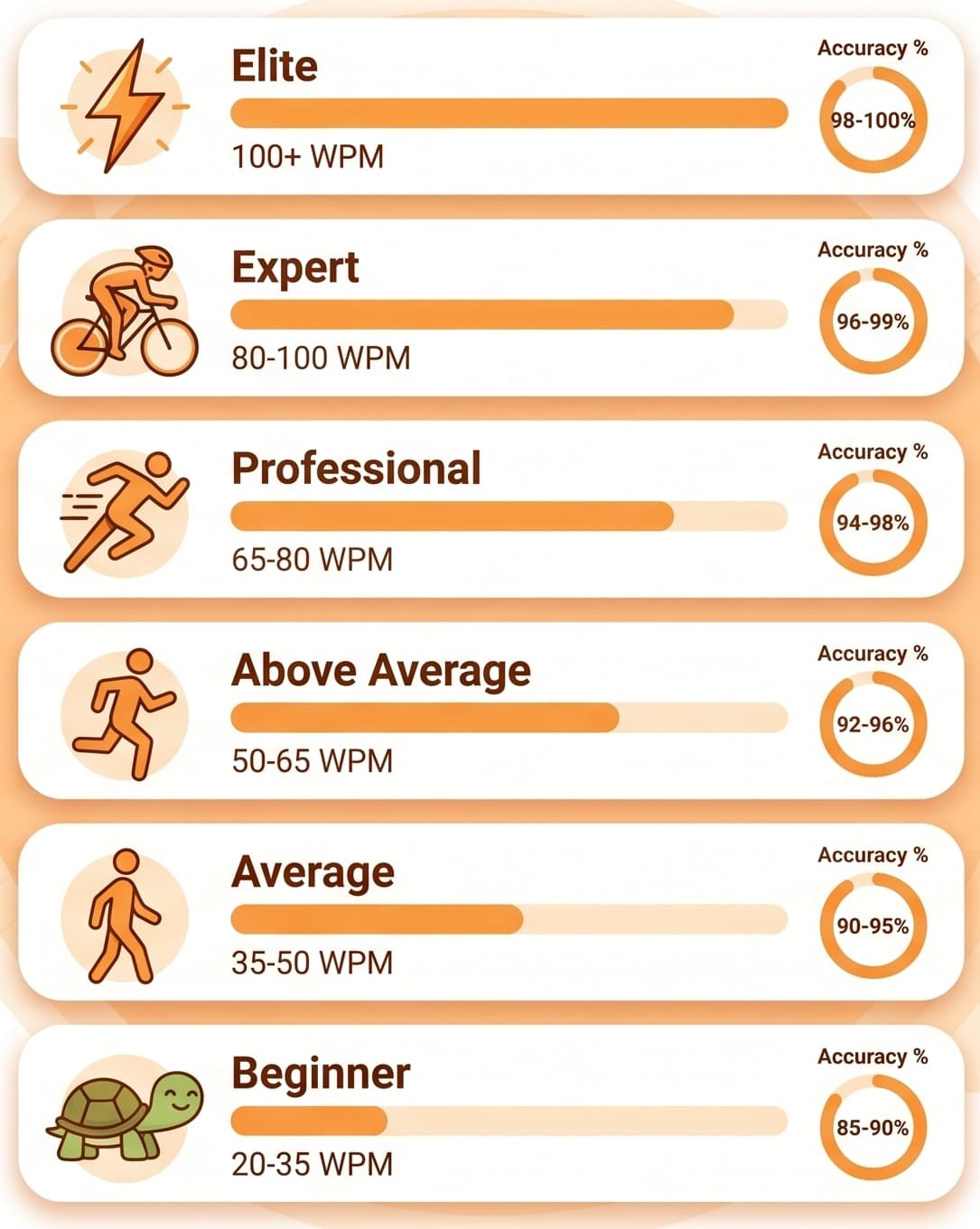
Here's where typing speeds land at each skill tier. These ranges reflect aggregated public typing-test data and industry benchmarks:
| Skill Level | WPM | Accuracy | What it feels like |
|---|---|---|---|
| Beginner | 20–35 | 90–94% | Hunt-and-peck; eyes on the keyboard |
| Average | 35–50 | 92–96% | Some touch typing; mostly looking at screen |
| Above Average | 50–65 | 95–97% | Comfortable home row; rare downward glances |
| Professional | 65–80 | 97–99% | Smooth touch typing; rhythmic flow |
| Expert | 80–100 | 98–99% | Pure muscle memory; near-perfect accuracy |
| Elite / Competitive | 100+ | 98–99%+ | Top 1% of typists worldwide |
Hitting 60 WPM with 97%+ accuracy is the realistic target for most adults who put in regular practice. That's the level where typing stops feeling like a task.
Average Typing Speed by Age
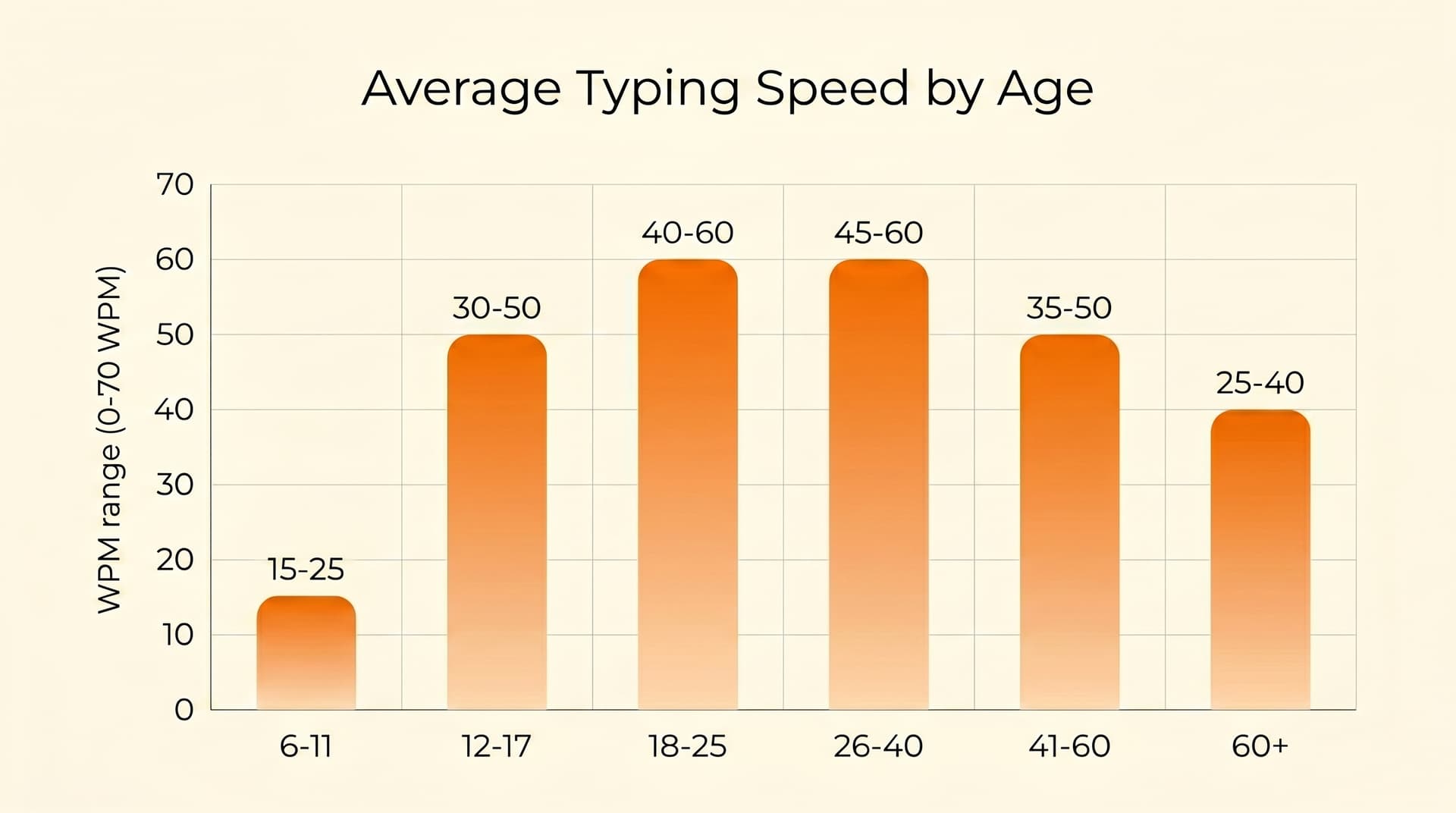
Typing speed tends to rise with keyboard exposure and then plateau. Younger learners are still building familiarity, while regular adult typists typically settle into a smooth rhythm.
These ranges reflect industry-aggregated typing-test data (note: figures vary by source and depend heavily on individual keyboard exposure):
| Age Group | Typical WPM Range | Notes |
|---|---|---|
| 6–11 | 15–25 | Learning keyboard layout; often hunt-and-peck |
| 12–17 | 30–50 | Rapid improvement from messaging and schoolwork |
| 18–25 | 40–60 | Peak learning years for most regular typists |
| 26–40 | 45–60 | Smooth rhythm from sustained office/school use |
| 41–60 | 35–50 | Stable for regular users; lower for occasional typers |
| 60+ | 25–40 | Often slower but typically more accurate |
A few things to keep in mind: these are typical ranges, not strict averages. Someone who's been gaming or coding for ten years will sit well above their age bracket. Someone who's only recently started using a keyboard regularly will sit below it.
For more on the speed-vs-accuracy tradeoff across age groups, see our guide on the most common typing mistakes and how to fix them.
Average Typing Speed by Job & Profession
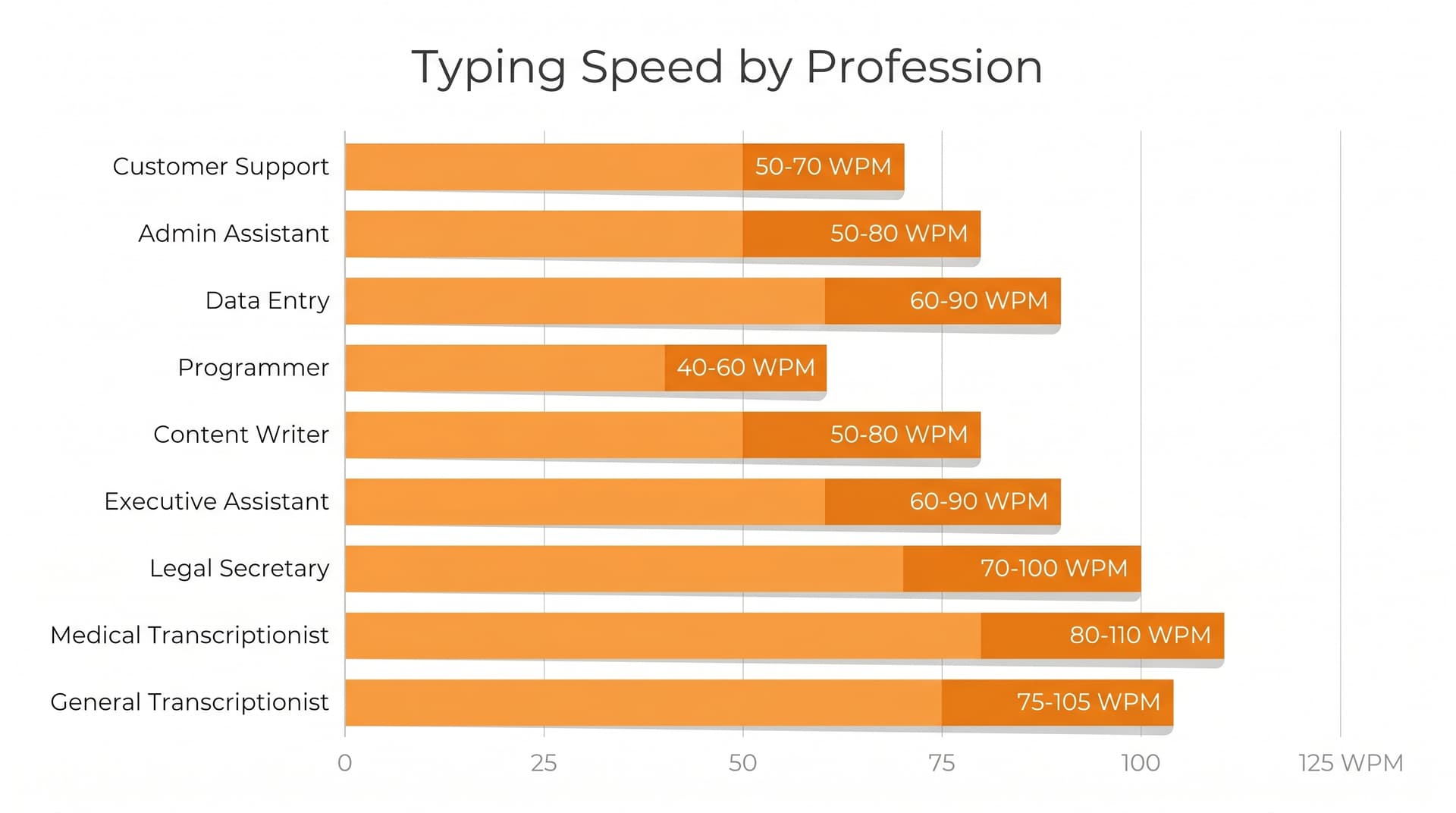
Different jobs require very different typing speeds. These numbers reflect typical industry expectations from sources like Wonderlic's typing speed by profession guide and the National Court Reporters Association certification standards:
| Profession | Typical WPM Required |
|---|---|
| Administrative assistant | 50–60 WPM |
| Customer support agent | 45–60 WPM |
| Data entry clerk | 50–70 WPM |
| Programmer / Developer | 50–70 WPM (often higher naturally) |
| Content writer / Journalist | 60–80 WPM |
| Executive assistant | 60–75 WPM |
| Legal secretary | 65–80 WPM |
| Medical transcriptionist | 65–80 WPM |
| General transcriptionist | 75–100 WPM |
| Court reporter (stenotype) | 200–225+ WPM* |
*Court reporters use specialized stenotype machines, not standard QWERTY keyboards. The NCRA certification requires 180 WPM for literary, 200 WPM for jury charge, and 225 WPM for testimony.
A consistent thread across all these jobs: accuracy matters as much as speed. Most employers test on net WPM (speed minus an error penalty), and many require 95–98% accuracy as a floor.
What Is a Good Typing Speed? Is 40, 60, or 100 WPM Fast?
A "good" typing speed depends on what you do with it. Here's a clear breakdown:
Is 40 WPM a good typing speed?
Yes — 40 WPM is the global average and is considered a solid baseline. It's enough for most office work, emails, and casual writing. It meets the minimum requirement for entry-level data entry and administrative roles, though many of those jobs prefer 50–60 WPM.
Is 60 WPM fast?
60 WPM is above average and considered fast for general typing. It exceeds the requirements for most administrative and customer support roles and falls within the typical range for content writers and developers. At 60 WPM, typing rarely feels like a bottleneck.
Is 80 WPM good?
80 WPM is professional-tier. It's the threshold for medical transcription, executive assistant work, and most demanding office roles. Around 10–15% of typists reach this level.
Is 100 WPM good?
100 WPM is excellent — only about 5% of typists reach this level. It's the threshold of competitive typing. Beyond this, you're entering enthusiast and professional speed-typing territory.
For a deeper benchmark check, try our 5-minute typing test, which gives a more accurate sustained-speed reading than 1-minute sprints.
How WPM Is Calculated
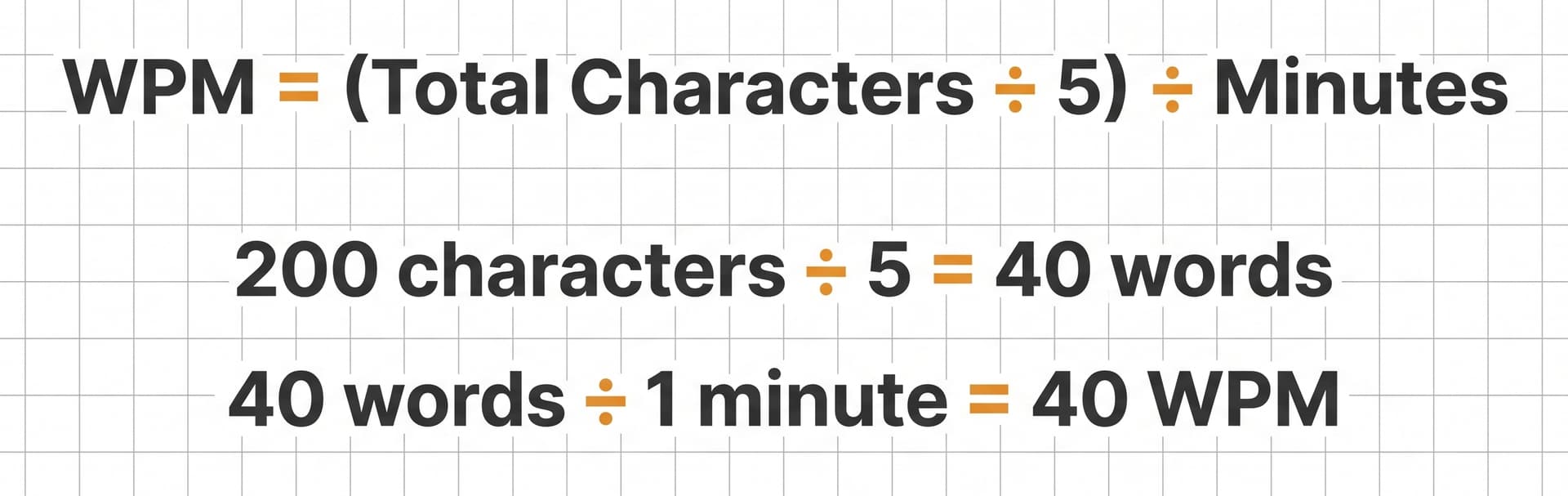
Most typing tests use a standardized definition: 1 word = 5 characters (including spaces and punctuation). The standard formula:
WPM = (Total characters typed ÷ 5) ÷ Time in minutes
There are two important variants:
- Gross WPM — your raw typing speed without accounting for errors.
- Net WPM — gross WPM minus a penalty for errors. This is what most employers and serious tests actually measure, since uncorrected errors create downstream cost.
A quick example: if you type 200 characters in 1 minute with 4 errors, your gross WPM is (200 ÷ 5) = 40 WPM. Your net WPM might be around 36 WPM after the error penalty.
You'll also sometimes see CPM (characters per minute). The conversion is straightforward: CPM ≈ WPM × 5. So 40 WPM ≈ 200 CPM.
For job applications that list KPH (keystrokes per hour) instead, the rough conversion is KPH ≈ WPM × 300. A posting requiring 10,000 KPH is asking for about 33 WPM.
Why Typing Speed Matters in 2026
Even with voice-to-text and AI writing tools, the keyboard is still the primary interface for most knowledge work. Here's what a faster typing speed actually unlocks:
- Time savings. A 40 WPM typist produces about 2,400 words per hour. A 60 WPM typist does 3,600. That's 50% more output for the same effort.
- Better focus. When you don't have to think about where the keys are, more attention goes to what you're writing.
- Fewer errors. Touch typists with proper finger placement typically have higher accuracy than hunt-and-peck typists, despite being faster.
- Lower fatigue and ergonomic risk. Spreading work across all ten fingers reduces strain on any single finger or wrist. The OSHA computer workstation guidelines cover the posture basics worth following.
- Career options. Many transcription, data entry, and admin roles have minimum WPM requirements baked into the application screening.
How to Improve Your Typing Speed
There's no magic shortcut, but consistent daily practice does work. Most people see meaningful improvement (10–20 WPM gain) within 4–8 weeks of daily 15-minute sessions. Bigger jumps are possible with more practice — but be wary of anyone promising guaranteed numbers, since results depend heavily on starting point and consistency.
Here's a step-by-step framework that works:
1. Set up correct posture. Sit upright, feet flat, wrists straight (not bent), and screen at eye level. Bad posture causes fatigue, which causes errors.
2. Master the home row. Place left index on F and right index on J (you can find them by feel — most keyboards have small bumps). Let your other fingers fall onto A S D F and J K L ;. Drill until the position feels automatic.
3. Practice touch typing without looking. Cover your hands with a cloth for the first few weeks. Looking down breaks the muscle-memory loop you're trying to build.
4. Take a daily 5-minute test. A short timed test gives you a real benchmark and shows which keys are slowing you down.
5. Set realistic weekly goals. Aim for +2–5 WPM per week as a beginner. Stretch goals of +10/week are possible with intense practice but harder to sustain.
6. Drill your weakest letters and bigrams. Most people have a slow ring finger or pinky. Five minutes a day on weak-finger drills (like was saw, lol pop, all opp) fixes weeks of imbalance.
7. Prioritize accuracy over speed. Speed comes from accuracy, not the other way around. Slow down until you're hitting 98%+ accuracy, then let speed grow on its own.
8. Take ergonomic breaks every 25 minutes. Long unbroken sessions cause fatigue and raise injury risk.
For a deeper walkthrough of the full beginner-to-pro path, our 10-finger typing complete guide goes step by step.
Common Mistakes That Slow You Down
Even motivated learners stall because of a few avoidable habits:
- Looking down at the keyboard. The single biggest blocker to building muscle memory.
- Using the wrong finger because it feels faster. Short-term gain, long-term ceiling.
- Skipping the home-row reset. If your fingers drift, accuracy collapses.
- Chasing speed before accuracy. Reverse the order and you'll plateau early.
- Bad posture. Slouching, bent wrists, screen too low — all cause fatigue and errors.
- Skipping the pinky. Many self-taught typists never properly use their pinkies, dragging both speed and ergonomics down.
5-Minute, 1-Minute & Free Typing Tests Compared
A typing test only helps if you use it the right way. Here's how the common test types differ:
- 1-minute typing test — best for quick check-ins and peak speed. Captures your "fresh" rhythm but misses fatigue.
- 5-minute typing test — the gold standard for sustained speed. Reveals fatigue, focus, and rhythm issues that 60-second tests don't surface.
- 10-minute typing test — useful occasionally for measuring long-form endurance, especially for transcription work.
The right approach: do a 1-minute test every few days for quick feedback, and a 5-minute test weekly for a real benchmark. Log both numbers and watch the curve climb.
For a fun way to break through speed plateaus, try the Falling Words game — it builds reflex under mild pressure.
Typing Glossary: WPM, CPM, Accuracy & More
- WPM — Words per minute. The standard measure of typing speed, calculated as (characters typed ÷ 5) ÷ minutes.
- CPM — Characters per minute. The raw count of every keystroke per minute, including spaces. CPM ≈ WPM × 5.
- KPM / KPH — Keystrokes per minute / per hour. Often used in data entry job postings. KPH ≈ WPM × 300.
- Gross WPM — Raw typing speed without error penalty.
- Net WPM — Gross WPM minus a penalty for uncorrected errors. The more accurate productivity measure.
- Accuracy rate — The percentage of characters typed correctly. 95%+ is the typical employer floor; 98%+ for legal and medical work.
- Touch typing — Typing with all ten fingers without looking at the keyboard.
- Hunt-and-peck — Typing using just a few fingers (typically two indexes) while looking at the keyboard.
- Home row — The middle row of letter keys (A S D F J K L ;) where fingers rest when not actively pressing other keys.
- QWERTY — The standard keyboard layout used worldwide.
- Dvorak — An alternative keyboard layout designed in the 1930s for ergonomic efficiency. Used by some speed typists.
Conclusion: Beat the Average, Join the Top Tier
The average typing speed is 40 WPM. The "good" range starts at 60 WPM, and the elite range starts at 100. The path between them isn't talent — it's technique plus consistent practice.
Start at the home row. Cover your hands. Drill accuracy before speed. Test weekly and watch the curve climb.
Ready to see where you stand? Take a free typing test on FastFingers right now — or jump straight into the 5-minute typing test for a more accurate reading.
Sources & References
- Wikipedia — Words per minute (Karat et al., 1999 study cited)
- Wonderlic — What is a good typing speed by profession
- National Court Reporters Association — Certification standards
- OSHA — Computer workstation guidelines
- Wikipedia — Barbara Blackburn (typist)