
Typing Platformer Game
Keyboard Jump
Type the word on the next platform to leap onto it. Wrong letters cost a heart.
Loading…
Typing Platformer Game
Type the word on the next platform to leap onto it. Wrong letters cost a heart.
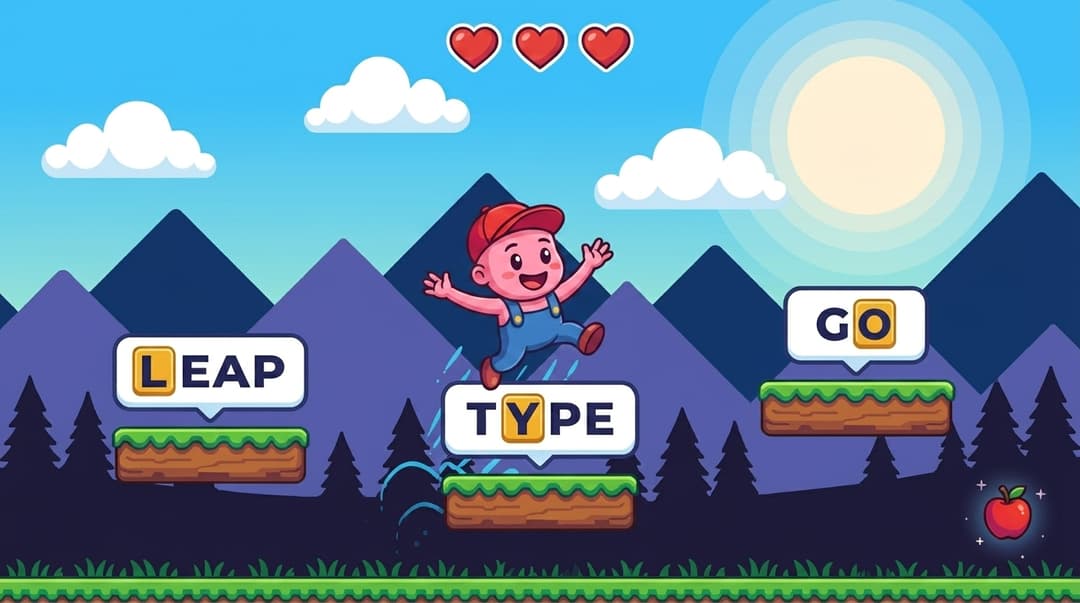
The keyboard jump game is a side-scrolling keyboard typing game where your character stands on a wooden platform. To the right are more platforms, each with a word painted on it. Type the word on the next platform and the character leaps to it. As you clear words the world scrolls left, new platforms spawn on the right, and the camera follows you.
You start with 8 hearts. Every wrong letter on the active platform costs one heart and lights the letter red. Every 20 platforms a level-up triggers — the scene theme shifts to a new palette and a pink heart pickup spawns on a future platform to refill your health (capped at 8). Treat it as a type to jump game — letters land you on the next ledge, mistakes leave you stranded.
Because the typing engine advances on word-completion (not on landing), a fast typist can pre-type the next word in mid-jump. The game queues the next leap automatically, so the rhythm stays smooth even at 100+ WPM.
The Words dropdown on the start screen picks which keys you're drilling. Pair it with Easy / Medium / Hard difficulty to control the word length. As a typing game by keyboard row, you can isolate a single row if you want to fix a specific weakness, or pick All Letters for general practice.
Random sequences from asdfghjkl. The classic home row typing game mode — proper typing game home row practice so your fingers learn the resting position before anything else.
Random sequences from qwertyuiop. Great for typists who can hit the home row but reach awkwardly to the top.
Random sequences from zxcvbnm. The trickiest row for most people — drilling it in isolation pays off fast.
Real English words from the FastFingers dictionary, length scaled by difficulty (Easy 3–4 letters, Medium 3–5, Hard 3–7). The default mode for general typing practice.
Random digit sequences from 0123456789. Useful if your day involves data entry, accounting, or anything where the number row needs to be as fluent as the letters.
3-letter words · 3–4 in dictionary mode
The right starting point. Short words give you time to commit each letter to muscle memory before the next platform appears.
4-letter words · 3–5 in dictionary mode
Standard practice setting. Words are long enough to test rhythm but short enough that one slip doesn't end the run.
5-letter words · 3–7 in dictionary mode
Long words and broader vocabulary. The default for typists already comfortable with the layout who want a real workout for fingers and eyes.
Speed-focused games like falling-word arcades reward burst typing — you race the clock and a few sloppy letters get absorbed into the combo. A typing platformer game reverses the priority. Each platform is a single discrete commitment: type the word cleanly and you advance, miss a letter and the cost is immediate. As a platformer typing game online it plays in the browser with no install needed.
That makes it particularly good for two situations. First, when you want to learn typing platformer-style — pick a row, play Easy, and your fingers internalise the layout without fighting other rows for attention. Second, polishing accuracy if you already type fast — the heart system makes you feel every error, which is exactly the feedback most fast typists stop getting from regular typing tests.
FastFingers ships two typing games and they train different skills. Most players use them together rather than choosing one.
A typical practice routine: 5 minutes of Keyboard Jump (Home Row on Easy if you're a beginner, All Letters on Hard if you're intermediate), 5 minutes of Falling Words on Medium, then a 1-minute typing test to measure the gain. Browse the full typing games hub if you want to compare modes side-by-side.
A typing test measures sustained WPM and accuracy on a paragraph. Keyboard Jump is a typing platformer game — every word is a discrete platform you commit to before leaping. Errors cost a heart instead of a single percentage point, so it rewards accuracy and finger discipline more than raw burst speed.
Yes. Pick the Home Row option from the Words dropdown on the start screen and every platform's word will be drawn from a-s-d-f-g-h-j-k-l. There are also Top Row, Bottom Row, All Letters, and Numbers categories so you can drill any zone of the keyboard in isolation.
The run is endless — platforms keep spawning to the right as you advance. Every 20 platforms you complete advances a level, the scene theme cycles to the next palette (Day / Sunset / Forest / Twilight), and a heart pickup is placed every 20 platforms to refill your health up to the cap of 8.
Yes. Keyboard Jump is completely free — no signup, no purchase, no ads inside the game. It runs in the browser, so as long as you have an internet connection you can play. A free FastFingers account is optional and only adds saved scores and leaderboard ranking.
Keyboard Jump is built for a real keyboard. The page will load on tablets and phones, but typing on a touch keyboard is too slow to keep up with the game. Use a laptop or desktop for the intended experience.
A wrong letter marks the position red and costs a heart, but the caret still advances so you can keep typing. The site-wide rule applies — two wrong letters in a row are blocked (the caret holds until you hit a correct letter). Run out of all 8 hearts and the run ends with a result card showing WPM, accuracy, level reached, and total errors.